Configuration
The BBS reads its settings from one file, bbs.conf. This page explains
how the file is laid out, how to edit it in the configuration screens, and
which settings can change while callers are on.
bbs.conf.sample
has every option with comments, and the
Configuration reference lists them all, section
by section.
Listeners
[general] holds the system-wide settings (name, database, log, banner,
message of the day, timeouts and limits). Each [listen NAME] section is a
port or unix socket that callers come in on, and its type says what kind
of caller to expect:
type |
What comes in |
|---|---|
telnet |
a telnet client; with tn3270 = yes (the default) 3270s get 3270 screens |
raw |
bytes as they come: app_dmodem's mode = tcp, a modemmenu tcp or unix item |
rlogin |
RFC 1282, as modemmenu's rlogin items speak it |
ssh |
SSH: the text BBS, logged in by password or key (SSH) |
address is host:port, or a path for a unix socket (with
socket_mode and socket_group). Any listener except ssh can read a
session header first (header = yes), and with trust_user = yes it
treats the caller as already logged in; see
Modem callers. (An ssh listener logs its callers in
itself.) petscii and rip say whether callers may be Commodores or
RIPscrip terminals (see PETSCII and RIP), and vt says
whether terminals are asked what they are (see
Terminal identification).
The sections
| Section | What it sets | Page |
|---|---|---|
[general] |
the system: name, sysop, database, log, banner, message of the day, logo, new users, limits, timeouts, file areas' directory and limits | here, Security |
[listen NAME] |
a port or socket callers come in on | here, Modem callers, TN3270 |
[ftp] |
the FTP server for the file areas | Files and FTP |
[news], [nntp], [peer NAME] |
newsgroups, the NNTP server, news peers | Newsgroups and NNTP |
[fido], [binkp], [link NAME] |
FidoNet: our address, the binkp mailer, links | FidoNet |
qwk_id (in [general]), [qwknet NAME] |
QWK packets' name; QWK networks this is a node of | Offline mail |
[door NAME] |
a door program | Doors |
screens_dir (in [general]), [menu NAME], [strings] |
the sysop's screens, menus and prompts | Customization |
scripts_dir (in [general]) |
the sysop's JavaScript | Scripting |
[security] |
deny lists, bans, the hack log | Security |
[event NAME] |
scheduled programs | Sysop tools |
[finger], [gopher], [gemini] |
the finger, gopher and Gemini servers | Finger, gopher and Gemini |
[irc] |
the IRC server for the chat rooms | IRC |
[mrc] |
Multi Relay Chat | MRC |
database (in [general]) |
SQLite's file, or a PostgreSQL, MySQL or MariaDB server | Databases |
[level N], new_user_level, validated_level (in [general]) |
access levels | Access levels |
[http] |
the HTTP API, its WebSockets, the web forum, the web terminal and metrics | HTTP API, Web forum |
[chan], chan (in [http]) |
the image boards | Image boards |
page_command (in [general]) |
telling the sysop of a page when they are not on | Chat and paging |
geoip, geoip_credit, phone_country, geoip_users, geoip_prefill (in [general]) |
where callers are: a country database for addresses, the home country of caller IDs; users who share theirs with the sysops; new users' locations filled in | Modem callers, Web forum |
bbs check reads the file and reports what it found. It warns about
anything risky, such as a password that may cross the network in the
clear, a socket that trusts whoever connects, or a link without a
password.
Editing it: the configuration screens
bbs -config /etc/bbs/bbs.conf config opens the setup screens on your
terminal for editing the file and the accounts, whether or not the BBS is
running. The same screens are in the sysop tools (F,
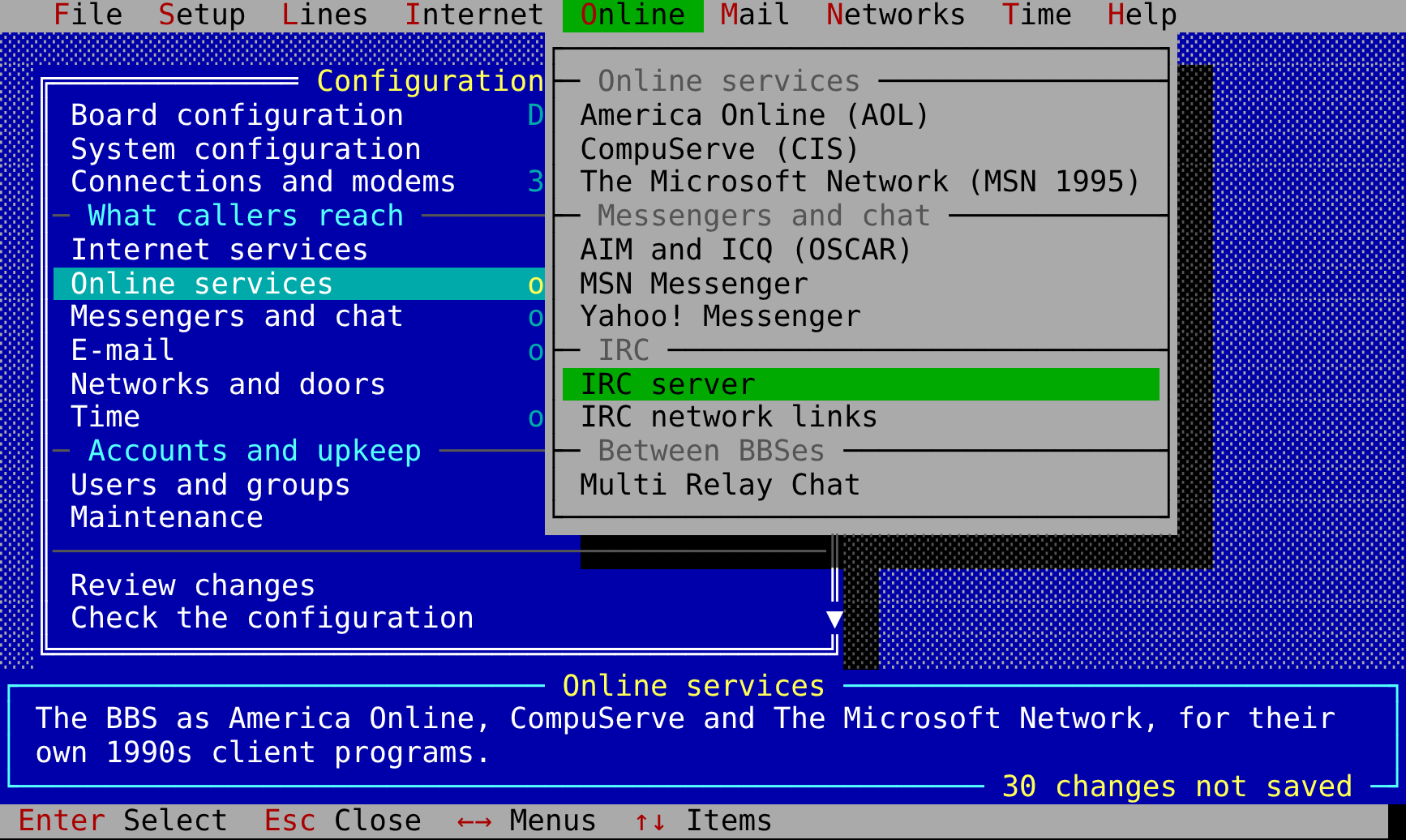
Configuration). On an ANSI terminal they look like the BBS setup programs
of the 1990s: a menu bar of pull-down menus, a shaded blue desk, each menu
a window over the one it was opened from, the line's help in a box below,
and values changed in boxes that pop up. They use PF keys on a 3270, and
become numbered lines on a terminal with neither.
| Menu | What is in it |
|---|---|
| Board configuration | the BBS's name, the sysop's, the location, postal address, dial-in numbers and internet addresses; the banner, message of the day, goodbye, logo; menus and prompts |
| System configuration | the user and group it runs as; the database and log; where files are kept and how large they may be; deny lists, the hack log, bans; scheduled events; every section of the file as it is |
| Connections and modems | modem lines and every listener; callers at once, logins, time-outs, lock-outs; passwords by modemmenu's auth socket (Modem callers); the caller ID country and GeoIP |
| Internet services | telnet, TN3270, SSH and RLogin listeners; finger, gopher, Gemini, FTP, news, the web (API, forum, image boards) |
| Online services | AOL, CompuServe (its listeners) and The Microsoft Network (its TCP host and dial-in listeners) |
| Messengers and chat | AIM and ICQ, MSN Messenger, Yahoo! Messenger, the IRC server, IRC network links and their peers, MRC |
[mail], the smarthost, POP3, IMAP, SMTP submission, MX and LMTP |
|
| Networks and doors | FidoNet and binkp, QWK networks, doors |
| Time | the clock and its sources, and the NTP, NTS-KE and PTP servers (Time) |
| Users and groups | the accounts (level, flags, sysop, locked, a new password; new ones; deleted ones) and the access levels |
| Maintenance | disk space; what message areas keep, old messages taken out; the image boards' archive; backups: one now, those made, [backup] (Backups) |
The menu bar's pull-down menus (/, F12, or Alt and the menu's red
letter) go straight to any of these from anywhere: File (review, check,
save, quit), Setup, Lines, Internet, Online (the online services and the
messengers), Mail, Networks, Time and Help.
System passwords (PAM, LDAP) are checked by modemmenu, which logs callers in and hands them to the BBS (see Modem callers). Running the BBS as a user of its own (System configuration's Run as user) is covered in Running.
| Key | What it does |
|---|---|
| arrows, PgUp, PgDn, Home, End | move (a letter goes to the next line beginning with it) |
| Enter | open a menu, change a value (typed in a box that pops up, or picked from a list of its choices), do an action |
| Space | turn a yes/no over, or go to the next choice |
| Esc, left arrow | back a window |
/, F12, Alt+letter |
the menu bar's pull-down menus (arrows between them, Enter to go) |
F1 or ? |
the whole help for the line (from bbs.conf.sample) |
| F9 | quit without saving (after a yes, if anything changed) |
| F10 | save and exit |
A, D |
add one (a listener, a door, a user ...), delete it |
| Ctrl-L | draw the screen again |
In a box where a value is typed, the arrows, Home and End move, Ctrl-U clears it, Enter keeps it and Esc leaves the value as it was. The screens are sent a changed cell at a time, so moving the bar costs a modem caller a few bytes, and a terminal without UTF-8 gets code page 437's lines and shading.
On a 3270, type S beside a menu to open it, type over values and send
them with Enter; PF1 is help, PF3 goes back, and PF9 and PF10 work like F9
and F10. On a terminal without ANSI, type a line's number to open or change
it, S to save and exit, or X to leave without saving.
Nothing changes until you save. A changed line is marked *, and the
help box counts the unsaved changes. The main menu's Review changes
lists them all, and Check the configuration reads the file as the BBS
would.
When you save, the file is checked first. It is not saved if the BBS would
not start with it, or if someone else changed it since it was read. It is
then written whole, keeping its permissions and owner, with the previous
version kept as bbs.conf.bak. Every comment stays where it was, and a new
key goes below the sample's commented example of it. After that, the
changes to accounts and areas are made. From the sysop's menu, settings
that can change while callers are on take effect at once, and the screen
says which ones wait for a restart. If there is no file yet, the screens
offer to start one from the sample.
Scripts can read and change one key at a time:
bbs -config /etc/bbs/bbs.conf config get general name
bbs -config /etc/bbs/bbs.conf config get "listen telnet"
bbs -config /etc/bbs/bbs.conf config set "listen ssh" address :2222
bbs -config /etc/bbs/bbs.conf config unset general motd
Each change is checked as the BBS would read it before it is written, and the command prints what changed and when it takes effect.
Changing it while callers are on
systemctl reload bbs (ExecReload in bbs.service.sample, which sends
SIGHUP) makes the BBS read the file again. If the BBS would not start with
the new file, nothing changes and the log says why. Otherwise the keys
below take effect at once, and the log lists the other changes, which wait
for a restart:
| Section | Keys that change at once |
|---|---|
[general] |
name, sysop, location, postal_address, phone, addresses, banner, banner_file, motd, motd_file, goodbye, new_users, max_nodes, attempts, fail_delay, login_timeout, idle_timeout, throttle_failures, throttle_time, page_command, qwk_id, geoip, geoip_credit, geoip_credit_url, phone_country, geoip_users, geoip_prefill, new_user_level, validated_level |
[level N] |
all, and levels added or taken out |
[backup] |
all (Backups) |
[menu NAME], [strings] |
all (a caller in a menu has it until they leave it) |
[chan] |
all but dir |
[http] |
forum_guests, forum_theme, forum_flags |
Listeners, servers (FTP, NNTP, IRC, the HTTP API and so on), networks, doors, the database and the log are set up when the BBS starts, so changes to them wait for a restart. So do settings a caller's session took when it began, such as its idle timeout. The sysop's Configuration screen applies the file itself when it writes it, and says which changes took effect and which wait.
bbs.service.sample's ProtectSystem=strict stops the service from writing
to /etc. For the Configuration screen inside the BBS to save, give the
service ReadWritePaths=/etc/bbs and give the bbs user the file. bbs
config run as root works either way. Be aware that if the BBS can write
its configuration, any sysop can make it run commands (doors, events,
page_command). Keep the file read-only if not every sysop is trusted as
much as root.
See also: Modem callers, TN3270, Security, Sysop tools